Microsoft Partner

Call Now:+44 7460 073 228

Business Central Payments

Take payment the same way in store, online and over the phone, with every sale landing in Business Central as it happens.

One payment layer for every channel

BC4 is a UK Microsoft Dynamics 365 Business Central partner. We bring payments into the complete retail solution we deliver around Business Central, so every channel takes payment the same way and finance sees the same numbers.

In many retailers, payments grew up channel by channel. The tills use one provider, the website another, and phone orders are keyed into a third portal. Each has its own reports, its own settlement and its own way of handling a refund.

The fix is a single payment layer integrated with your point of sale and with Business Central. A sale on the shop floor, an online order and a payment taken from a sales order all post to the same records, whichever provider sits behind them.

The terminals are part of that design too. We scope the devices, the payments and the deployment together, so the hardware in your stores works with your till and with Business Central.

What changes when payments join the platform

Every channel

The same payment, wherever it is taken

Card, contactless and wallet payments at the till, on a mobile device, online and from a sales order feed one set of reporting in Business Central.

  • Take payments in store, online and over the phone
  • One provider across tills, mobile point of sale and your website
  • Returns and refunds that work between channels
A customer paying with a smartphone on a card terminal
Your provider

A commercial choice, not a systems one

Because payments sit in an integrated layer rather than inside one provider, choosing or changing an acquirer does not have to mean replacing your point of sale or your ERP. It also avoids paying for a separate integration with each provider.

We work with Adyen, Worldpay and Elavon, and help you compare them against your sites, your banking relationships and your volumes.

A phone showing a mobile payment held against a card reader
Control

Reconcile, refund and keep trading

The details that matter are rarely the card swipe itself. They are what happens afterwards, and what happens when something goes wrong.

  • Payments data held alongside sales, stock and customer records
  • Settlements matched to sales, instead of rebuilt from provider portals
  • Refund rules agreed up front, including online orders returned in store
  • A plan for outages, including whether offline payments suit your stores

Payments, planned properly the areas we cover with you

These are the parts of payments that most often cause trouble after go-live. We plan them with you before anything is switched on.

Terminals and mobile payments

Card, contactless and wallet payments on fixed and mobile terminals, rung through to stock and finance as the sale is taken.

Card not present

Take payment over the phone or send a payment link from a sales order, with the payment recorded against that order.

Returns and refunds

One provider across channels makes it possible to refund an online purchase in store. The rules depend on the provider and payment method, so we agree them first.

Settlement and reconciliation

Providers pay out on different days and bank statements carry little detail. We set up the reporting so finance can match payouts to sales in Business Central, not in a separate portal.

Payment hardware matched to how you trade

Fixed terminals and tills

For permanent tills and customer-facing counters. Integrated with the point of sale, so the amount goes from the till to the terminal and the result comes back, with no keying twice.

Portable devices and tap on phone

For queues, concourses, pop-ups and events. Some portable devices take the order and the payment on one handheld and print the receipt. Where the provider supports it, a phone or tablet can act as the terminal.

Self-service and unattended

Kiosks and self-checkout need a terminal that takes payment without staff. What is available depends on the provider and the kiosk hardware, so we scope it case by case.

What we scope with you: how the terminal connects to the till, Wi-Fi or 4G connectivity, battery life, receipt printing, certified hardware, offline limits and remote support across the estate.

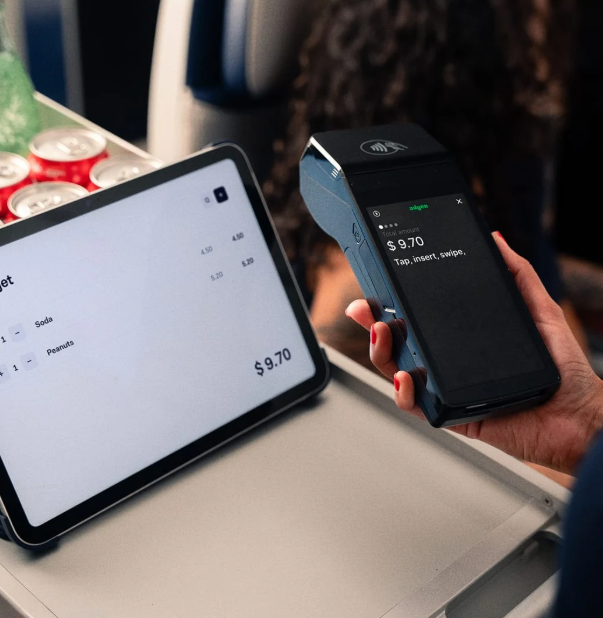
Castles S1F4 Pro portable payment terminal showing an amount due

Mobile route: Adyen and Castles S1F4 Pro

A portable payment and service route configured and tested by BC4 for counters, concourses and mobile trading. Order and payment on one portable device, with integrated receipt printing for mobile service.

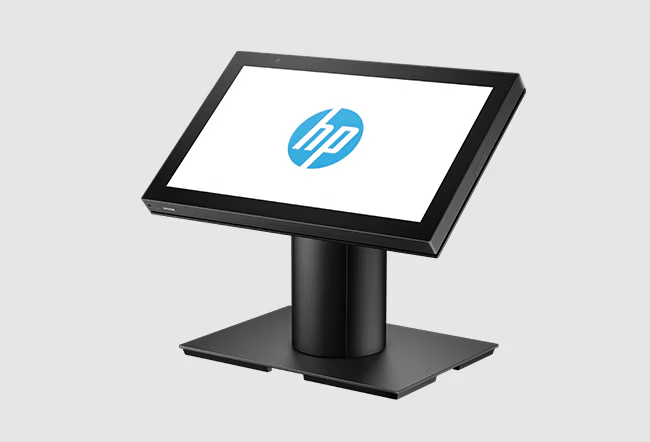
HP Engage One Pro G2 fixed point of sale terminal

Fixed route: HP Engage One Pro G2

A premium fixed point of sale route for permanent tills, flagship stores and customer-facing counters, with peripherals and the payment route designed around the operation.

Our payment partners Adyen, Worldpay and Elavon

Adyen

A global payments platform and licensed bank that handles online, in-person and embedded payments from one system.

About Adyen and BC4

Worldpay

A global payments technology company covering stores, online and omnichannel journeys, with fraud and risk tools built in.

About Worldpay and BC4

Elavon

A global payments processor and part of U.S. Bank, offering in-person and online acceptance as an alternative to Adyen.

About Elavon and BC4

Fees depend on the provider and your volumes. We go through the options with you.

Is it time to rethink payments?

It is usually the right time when

  • You take payments through more than one provider or channel
  • Reconciling takings against sales takes real time each day
  • Online orders cannot easily be refunded or collected in store
  • Payment faults at the till affect trading
  • You are replacing your point of sale or ERP and can bring payments in at the same time

It may be too early if

  • You take few payments and reconcile in minutes
  • Your payment provider is under contract and works well
  • Your core system is about to change, so payments should wait

If that sounds like you, it may make sense to look at payments as part of a wider system review.

Frequently asked questions

Can card payments run through Business Central?

Yes. Payments are taken through an integration between your point of sale or sales orders and a payment provider, so each sale is recorded in Business Central as it is taken. For LS Central and Business Central, LS Retail's LS Pay is one integrated payment layer that connects to a range of providers. BC4 works out which route suits your set-up.

Which payment terminals do we need?

It depends on how you trade. Fixed terminals suit permanent counters, portable devices suit queues, concourses and events, and some providers support tap on phone. We scope the devices with your point of sale and payment provider, and BC4 configures and tests payment routes such as Adyen with the Castles S1F4 Pro for mobile trading and HP Engage hardware for fixed tills.

Does the card terminal connect to the till?

It should. In an integrated set-up the point of sale sends the amount to the terminal and the result comes back, so staff do not key the amount twice and the sale is recorded in Business Central. Standalone terminals can be quicker to start with, but they leave the amount and the result to be handled by hand.

Can we take payment over the phone or by payment link?

Yes, card-not-present payments can be taken from a sales order, either by entering the card details or by sending a payment link. The payment is then recorded against the order in Business Central. Exactly what is available depends on the payment layer and provider you use.

Can an online order be refunded in store?

That is the aim of using one payment provider across channels. LS Pay, for example, describes cross-channel tokenisation so items can be returned between channels. How refunds work in practice depends on the provider, the payment method and your set-up, so we agree the rules with you before go-live.

What happens to payments if the internet drops?

It depends on the terminal, the provider and the limits you set. Some providers offer offline modes, such as Adyen's store and forward, so a store can keep trading through an outage. Offline payments carry risk because they cannot be authorised in real time, so we plan this with you rather than switching it on by default.

Which payment providers does BC4 work with?

BC4 partners with Adyen, Worldpay and Elavon. Adyen offers one platform across online, in-person and embedded payments. Worldpay covers the shop floor, online and the contact centre. Elavon is part of U.S. Bank and offers in-person and online acceptance. We help you compare them.

What do payments cost?

Fees are set by the payment provider and depend on your volumes, card mix and the channels you take payments through. We do not quote provider fees on this page. We go through the options with you and the provider so you can compare like for like.

Is it secure and PCI compliant?

Card payments carry security and compliance requirements, and the providers we work with maintain the certifications that apply, such as PCI DSS. Your own responsibilities depend on how you take payments, for example on a terminal or by typing in card details, which we cover with you.

Can we change provider later?

Because payments are integrated around your point of sale and Business Central rather than built into one provider, the choice of processor does not have to mean a different POS or ERP. Moving still takes planning, so talk to us early.

Talk to us about your payments

Whether you want to bring one site or a whole estate onto a single payments platform, we can show you how it fits alongside Business Central.